Crossword Maker
Download this program (members only)Not a member? Register Here
GUARANTEED 100% CLEAN
Our Files DO NOT Contain Adware, Spyware, Viruses, Toolbars Or Any Other Third Party Software
Click here for lots more games puzzles from Grey Olltwit.
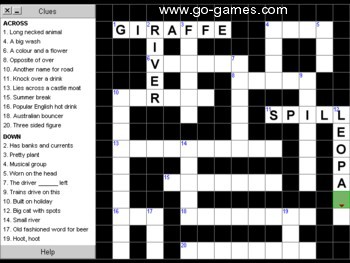
Colours and size of screenshot reduced to fit page
Suitable for UK Key Stage 2, 3, 4 & 5 - USA 2nd to 12th Grade (Age 7 - adult)
Recommended Minimum System: PC, Windows 95/NT4 or better e.g. XP, Vista, Windows 7, (Mac users click here), with 16MB Ram, Pentium 166, Sound Card.
Make your own crosswords with my crossword maker software. Print them out or try
within the program. Crosswords can be saved to finish or edit at
another time. Includes an uninstall facility. Compressed file size - 995 KB.
A number of crosswords are contained with the install program. These were kindly contributed by SK Phillips of West Virginia, USA. My thanks to SK for these puzzles and all the time he freely gave in the testing of Crossword Maker: and Barry Munyard of Western Australia. My thanks to Barry for these puzzles. If you read this Barry, I keep trying to contact you via email but I don't seem to ever get through.
Try many of the crosswords online now
Crossword puzzles date back to around 1913. It's widely believed a Liverpool journalist, Arthur Wynne made the first crossword games puzzles. These were published in the New York World and became a regular weekly feature apparently. They can range from the very simple to the very cryptic and so can be suitable for all ages. Using clues to give an idea of the word or phrase to fill in the blank squares in the grid and as the answers cross each other, hence crossword puzzle, each answer you get right, gives more clues to another answer. There are many varieties of word games puzzles and quizzes but the crossword remains a firm favourite around the world.
With the ability to exercise the mind of both young and old, the crossword puzzle is a great learning tool. With my crossword maker above, you can easily create games puzzles for students, family members from children to adults. It all depends on the level of difficulty you want to add and how cryptic you can be. Many schools and homes around the world use my crossword maker as educational software and with the ability to save them you can always return to one later without the need for trying to find the book or paper that they were in.
What's new in v1.12:
Updated with numeric option for maths crosswords.
For help with downloading and installing, click here
On the first screen click on either the Make Or Edit A Crossword or Try A Saved Crossword button depending on whether you want to make or edit existing crossword puzzles or try one already made. If you want to submit some crosswords you have made in the program for inclusion in these packs please contact me by clicking here.
Make Or Edit A Crossword
On the main edit screen you will see a grid of squares. You will notice that there is one red coloured square which follows your mouse pointer over the grid. If you click on this red square it will lock in place and turn green. This is where your answer will start. To unlock the square simply click it again and it will turn red and follow the mouse pointer again.
You will also notice that this square has a small arrow which points in the direction of where you want your word to appear on the grid. If you right mouse click on the coloured square you will see the arrow changing direction. Whichever direction the arrow is pointing is the direction your word will take when the square is locked (turned green) and you type a letter on your computer's keyboard. Typing a letter automatically moves the locked square on one step in the direction of its arrow.
Each answer you type into the grid will need a number at the beginning to match with the clue you will type in the yellow boxes on the left of the screen. To do this, make sure the control box is locked and coloured green and not over the first square where you want the number to appear. Move your mouse pointer over the first square of your answer and right mouse click. A small menu will appear where you can Add a number from a list, Remove a number or remove all numbers.
To add Clues simply type them in the yellow boxes on the left of the screen under either ACROSS or DOWN. Make sure you add a number at the beginning of each clue as per the example crossword included with the program.
If you find you need to change the order of the clues, click on the Swap button. This will open a new small window showing the Across Clues first. You can move a selection up or down the list by left mouse clicking and dragging it. To save these changes click the Update button in this new window. To leave the original list intact just close the list by clicking the cross in the corner of the small window. There is also a Down Clues button to change those in the same way.
Once you have entered all the answers and clues you want to (maximum 22) make sure you save your crossword by choosing Save this crossword as.. in the top menu under File (see below for more details). Then you can get the program to replace your answers in the grid with blank squares by selecting Clear Answers in the top menu under Options. This can take a few seconds depending on the speed of your processor, so a progress bar will show and then disappear when the job has been completed. You can then copy, print or try your crossword as per the instructions below.
In the top left of each screen is a Cross button to close the program and a Minimise button which will drop the program to your Taskbar so that you can open another program.
Grey Olltwit Educational Software Home Page