Guide To England Geography Game
Download Guide To England (members only)Not a member? Register Here
GUARANTEED 100% CLEAN
Our Files DO NOT Contain Adware, Spyware, Viruses, Toolbars Or Any Other Third Party Software
Click here for lots of other educational software, games and screen savers from Grey Olltwit.
Actual size and colours reduced for screen shot.
Suitable for UK Key Stage 2, 3, 4 & 5 - USA 2nd to 12th Grade (Age 7 - adult)
Recommended Minimum System: PC, Windows 95/NT4 or better e.g. XP, Vista, Windows 7, (Mac users click here), with 8MB Ram, Pentium 75, Sound Card.
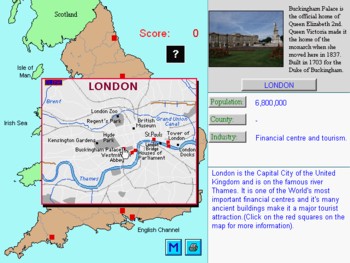
Learn interesting facts about England in this geography game. Includes historical and economic information plus a quiz. Also includes small map of London and photos of famous buildings there e.g. St.Paul's, Westminster Abbey, Buckingham Palace etc. Print out maps and a certificate showing progress. Compressed file size - 878 KB.
For help with downloading and installing, click here
The opening screen is the Main Menu, which you can return to from each section of the program by clicking on the "M" button. The functions in the drop down menus in the top left of your screen are self-explanatory i.e. quit, closes the program. Pressing Alt and F4 also closes the program.
The menu buttons, Maps, Cities, Counties and Quiz take you to that section of the program and these are explained below. Exit also closes the program.
Maps
Use the magnifying glass plus and minus buttons to zoom in and out and view basic maps of England, Europe and the World. The Print button will send the Map on view to your printer. M returns you to the Main Menu.
Cities
Click on a red square on the map to show details about that city. Click on the missing word in the text covered by a black box to show four souvenirs that Grey Olltwit could have bought here. The uncovered word should give a clue as to which object was chosen as a souvenir. Click on the one you think was chosen and score points for the correct one or lose points for the wrong one. Bonus stars from 1 to 10 will be awarded as you progress. These will be displayed on your certificate, which can be printed out at the end of this level.
After completion of this level you can stay and browse through the cities by clicking on each one. Remember London, which is not part of the scoring in this level but contains a small Map and extra red squares to click on, giving more information and some pictures of famous landmarks in the Capital City. You can send whatever is displayed on the screen at anytime by clicking on the Printer button. Clicking on the M button will take you back to the Main Menu but a further window will appear if you have been awarded a certificate for this level. Choose the Yes button to take you to the certificate level and print it out or No to return to the Main Menu.
Counties
In this level you simply click on the county on the map you think is the one highlighted in red. If right, it will change colour and present you with the next one. To help you, holding down the space bar at anytime will reveal all the County numbers. Holding down the space bar also reduces your score, so don't hold it down for too long. Gold stars are awarded as you progress through this level and are shown on your certificate.
You can send whatever is displayed on the screen at anytime by clicking on the Printer button. Clicking on the M button will take you back to the Main Menu but a further window will appear if you have been awarded a certificate for this level. Choose the Yes button to take you to the certificate level and print it out or No to return to the Main Menu.
Quiz
Here you are presented with a list of the souvenirs chosen at each City in the Cities level. You must match these with where you think the City is on the map. First click on a red square on the map and then click on the object you think was the souvenir from this city. If you are right then the city's name will appear and points awarded. Points are deducted if you are wrong. Gold stars are awarded as you progress through this level and are shown on your certificate.
This is followed by a general quiz on English Cities and Counties, including historical information. All the answers are contained in the text written about each city in the Cities level.
You can print whatever is displayed on the screen at anytime by clicking on the Printer button. Clicking on the M button will take you back to the Main Menu but a further window will appear if you have been awarded a certificate for this level. Choose the Yes button to take you to the certificate level and print it out or No to return to the Main Menu.
Grey Olltwit Educational Software Home Page