Tell The Time
Download Tell The Time (members only)Not a member? Register Here
GUARANTEED 100% CLEAN
Our Files DO NOT Contain Adware, Spyware, Viruses, Toolbars Or Any Other Third Party Software
Click here for lots more educational software
Colours and size of screenshot reduced to fit page
Suitable for UK Key Stage 1, 2, 3, 4 & 5 - USA 1st to 12th Grade (Age 5 - adult)
Recommended Minimum System: PC, Windows 95 or better e.g. XP, Vista, Windows 7, (Mac users click here), 16MB Ram, Pentium 166 and sound card.
Based on an idea received from Susan Alastair. Basically in the game you click a Question button and the time is spoken to you (plus shown on screen). You then have to set the hands to the right time and you score points for getting it right. There are 3 levels of difficulty. On the first the questions are only O'clock, quarter to/past and half past the hour. Level 2 adds 5, 10 past etc., questions and level 3 is the minutes in between. There is also a Practice level where you can set the hands to any time and hear the time spoken to you and there is a certificate to print out too.
You can choose in the game to learn the modern (digital), or the traditional (quarter past, half past etc.) clock. In the latest version 1.5, you can choose to play using the Keyboard or Mouse and the graphics have been improved.
Program includes an uninstall facility.
Compressed file size - 1.54 MB.
Play the online version
For help with downloading and installing, click here
How To Play
On the first screen you have three buttons I Know How To Play, First Time Here and Practice Level. Click one of these buttons to start. If you choose I Know How To Play then you are taken straight to the Choose A Clock (see below) screen, whereas clicking First Time Here will take you to the Choose A Clock screen but on the main game screen a small window will appear with some brief instructions on what to do. Click OK on this window to start playing the game. Clicking Practice Level will take you to that level which is explained below.
Choose A Clock Screen
On this screen you are given two choices. Today there are two ways of telling the time using the twelve hour clock. The modern way is using the digital clock and reading the numbers as they appear in the display e.g. "eight forty five" for 8:45. In the traditional way however, that time, 8:45, is spoken as "a quarter to nine". Confusing I know but the traditional way was used before digital clocks were around and is still very popular today. Clicking either the Modern or Traditional buttons will take you to the main screen for that clock.
The Main Screen
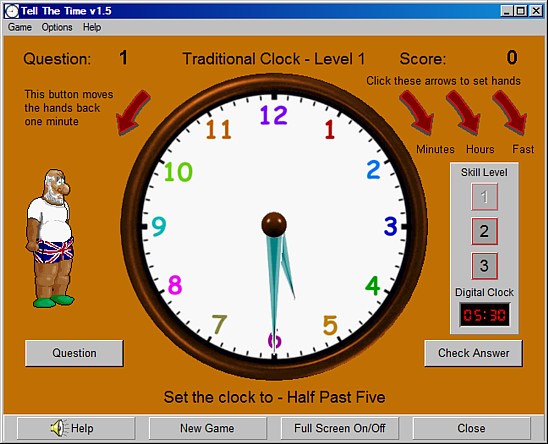
Here you have a clock with hands that you can move. Just to the right of the clock you will see three arrows. These are the buttons used to move the clock hands. The one on the left moves the minute hand in steps of one minute whilst the button in the middle moves the hour hand in one hour steps. The button on the right moves both round quite quickly. On the left of the clock face is one button pointing the other way. Clicking this button moves the hands back one minute, in case you go too far with the buttons on the right!
Just below the arrow buttons is a Skill Level box. You will find that you can move the pointer up or down between levels 1,2 and 3. 1 is the easiest level and gives questions only on O'Clock, 15/45 (Quarter Past/To) and 30 (Half Past). Level 2 questions include 5, 10, 20 past the hour etc. and Level 3 questions include the minutes in between.
Below the Skill Level box is a Check Answer button and in the same position on the left side of the screen is a Question button. Clicking the Question button will show a time question below the clock and you should also hear me asking the question. You then set the hands of the clock using the arrow buttons to the time you think it should say. When you are happy with where you have moved the hands, then press the Check Answer button. If you are right then you will see and hear a "Well Done" or "Correct" message plus points will be added to your score. 10 points for correct Level 1 answers, 20 for Level 2 and 30 for Level 3 ones. Your points are shown in the top right hand corner of the screen and the number of questions completed in the top left.
If you set the hands incorrectly then you will hear and see a "Please Try Again" message from Grey Olltwit on the left of the screen (no I don't really look like that). Three incorrect tries will pop up a message and a button asking if you would like me to set the hands for you. If you do then click the Yes Please button or you can keep trying. You don't lose any points for a wrong answer or letting me set the hands for you but you don't gain any either.
At any time you can move to the Certificate screen by choosing View/Print Certificate in the top menu under Options or you can move to the Practice Level in the same menu.
Practice Level
In this level you can move the hands of the clock using the arrow buttons as described above and then click the Tell Me The Time button in the bottom left of the screen. I will then show you the time and speak it too. There is a button to set the hands of the clock to the current time on your computer's clock and above that button is a Click Here To Play The Game button which will take you to the main program screen. Both Modern and Traditional clocks (see Choose A Clock above) have a practice level so you can try both.
Grey Olltwit Educational Software Home Page
Book your next trip to the Rocky Mountain 24/7 | 4*4 | Denver Airport 24/7 | Denver to Vail transfer InterMountain Express provide Luxury SUV, Private Shuttle, Black car, Executive Van, LImo Service, airport transfer, town car, up to 14 PAX. Hirola Infotech Solutions is one of the Best Digital Marketing company in Bangalore,Ranked among the Top digital marketing agencies in Bangalore Digital Marketing, Web Development, Software and mobile app development Company In Bangalore, India Best Best Digital Marketing company in Bangalore,Top digital marketing agencies in Bangalore, ppc, seo Hirola InfoTech Solutions, your number one source for our passion for helping small and medium size businesses has grown us into a full service strategic marketing company ,we are end to end provider of Digital marketing Web development & Applicatio .